Everything a show needs.
Shown as it really is.
Every screenshot here is Kinelight itself, running a real show. A lighting desk, a busk surface, a timeline, a pyro controller, a network monitor and a remote — in one app on your Mac.
Control
Every light on one screen
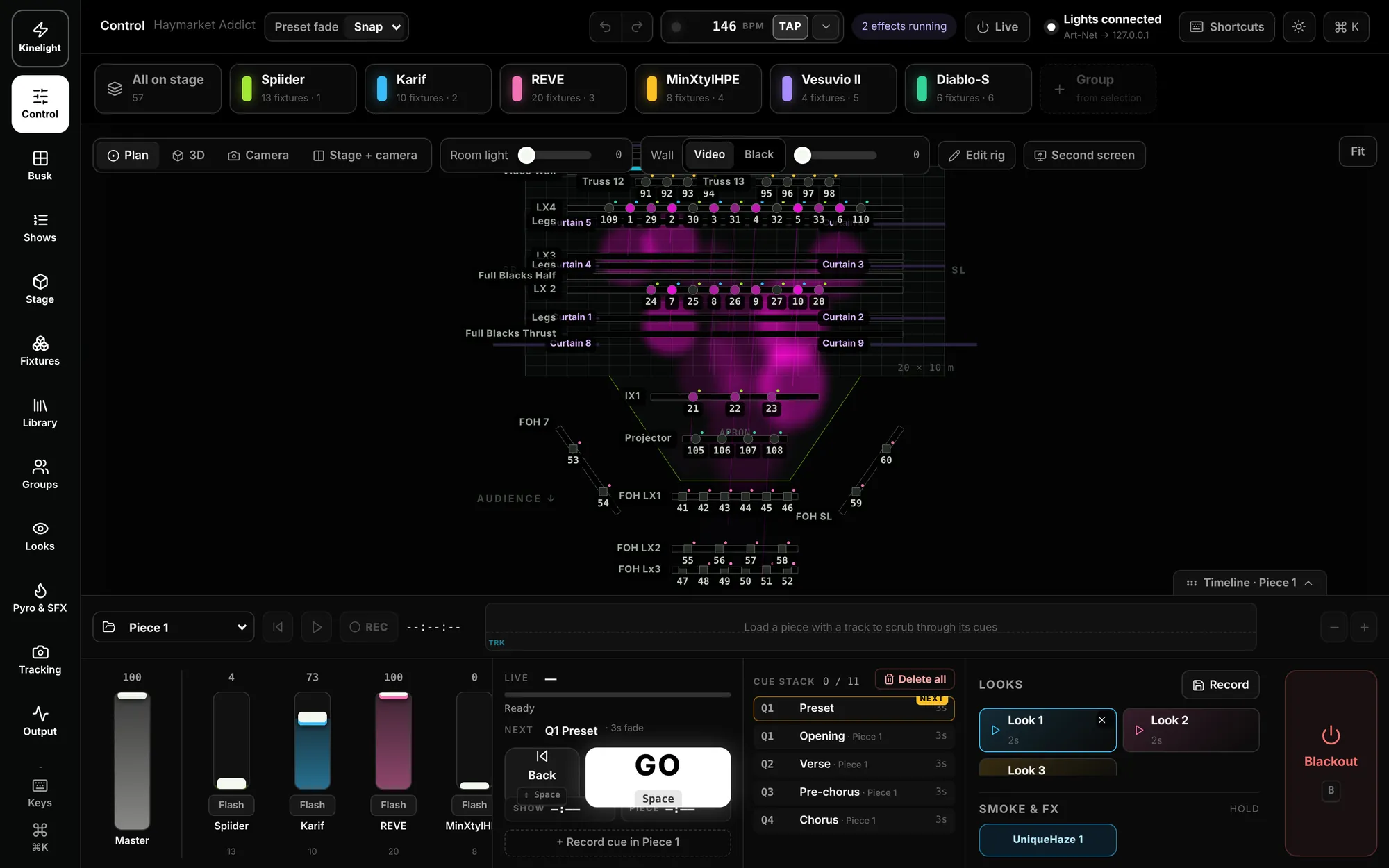
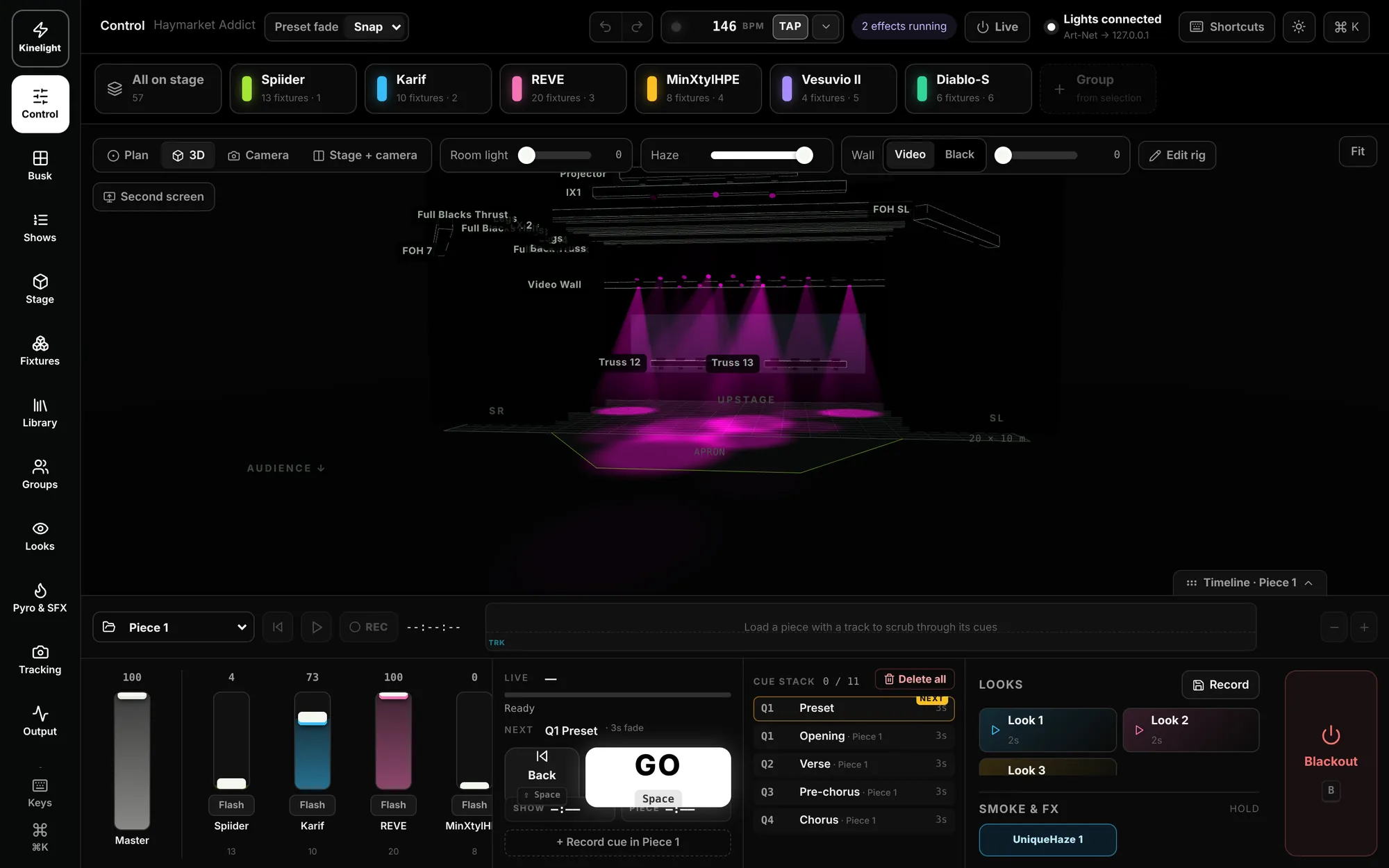
Group tiles along the top, your stage plan in the middle, faders, GO and the cue stack along the bottom. Switch the plan to 3D or a camera, and keep one big Blackout in reach.
- Tap groups to take them, double-tap for just that one
- Plan, 3D, camera, or stage and camera side by side
- Faders with flash, GO and Back with live and next
- Looks, smoke & FX and Blackout always one tap away
BuskKinelight Pro
A busk page you build yourself
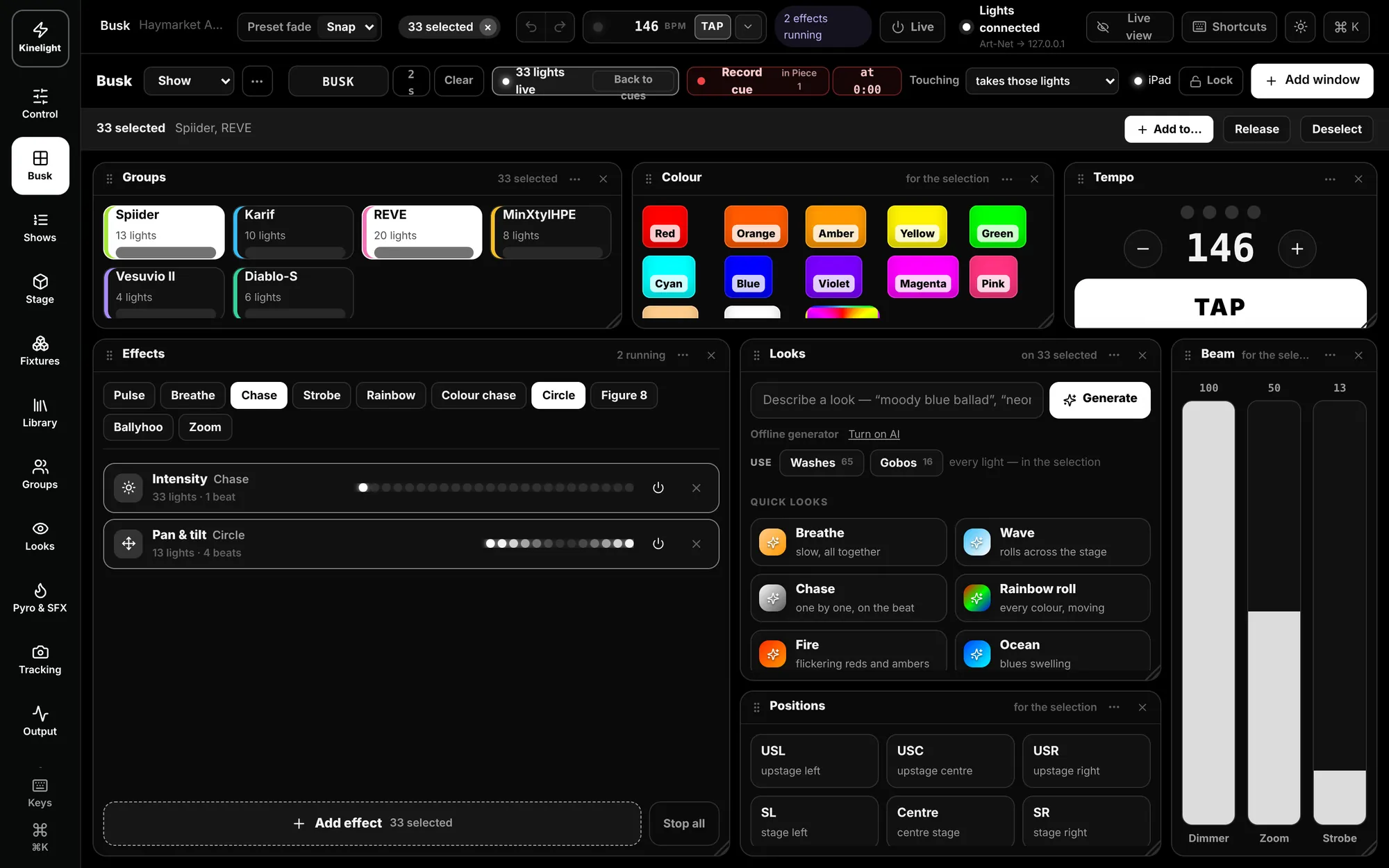
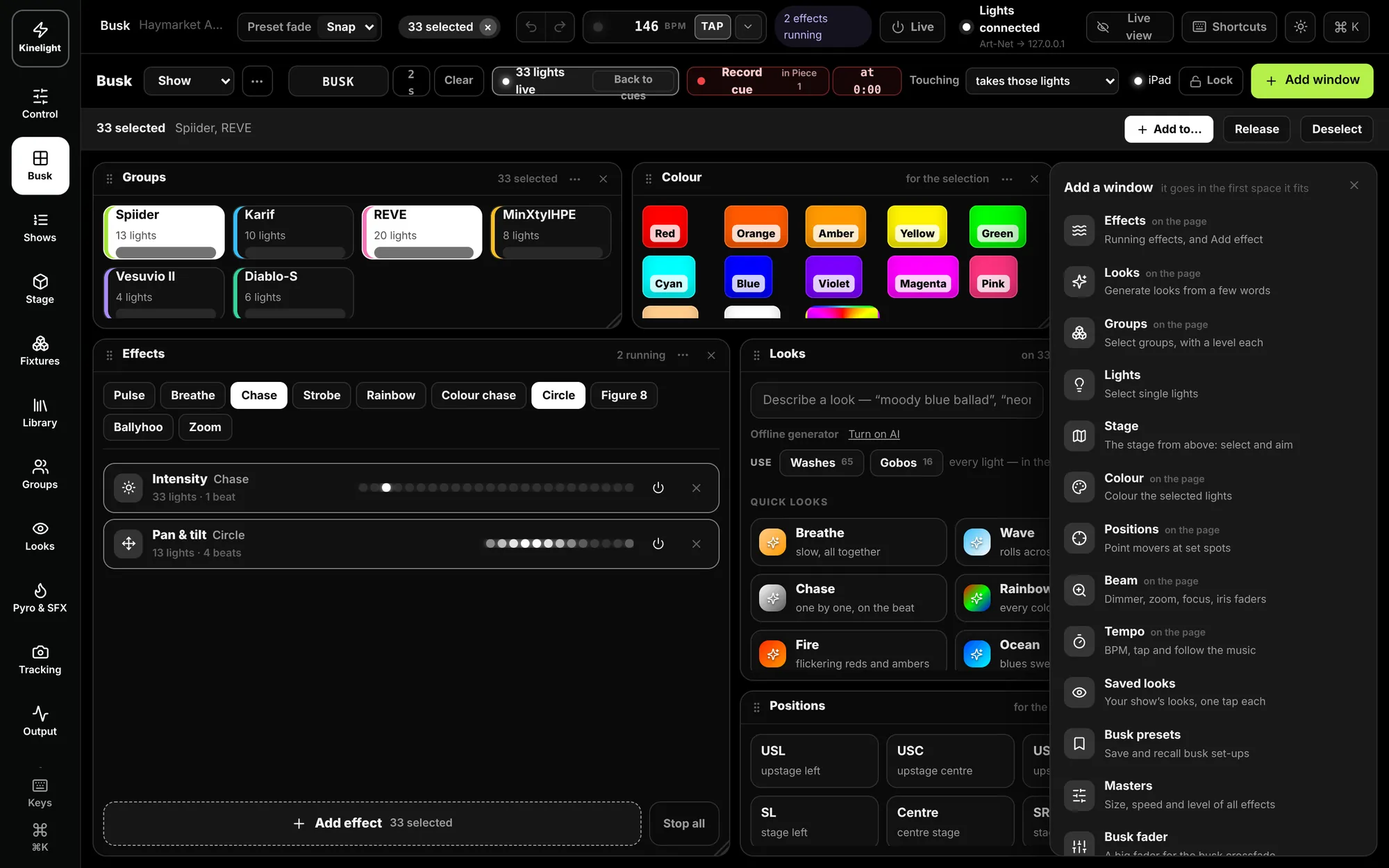
Windows for groups, colour, tempo, effects, looks, positions and beam — add the ones you want, put them where you like, pin and lock them. Effects stack in layers, and whatever you busk can be recorded straight into the song.
- Pulse, breathe, chase, strobe, rainbow, colour chase, circle, figure 8, ballyhoo and zoom
- Masters for the size, speed and level of every effect
- A busk fader with 2 s and 5 s fades
- “Touching takes those lights” — grab any light mid-cue
ShowsKinelight Pro
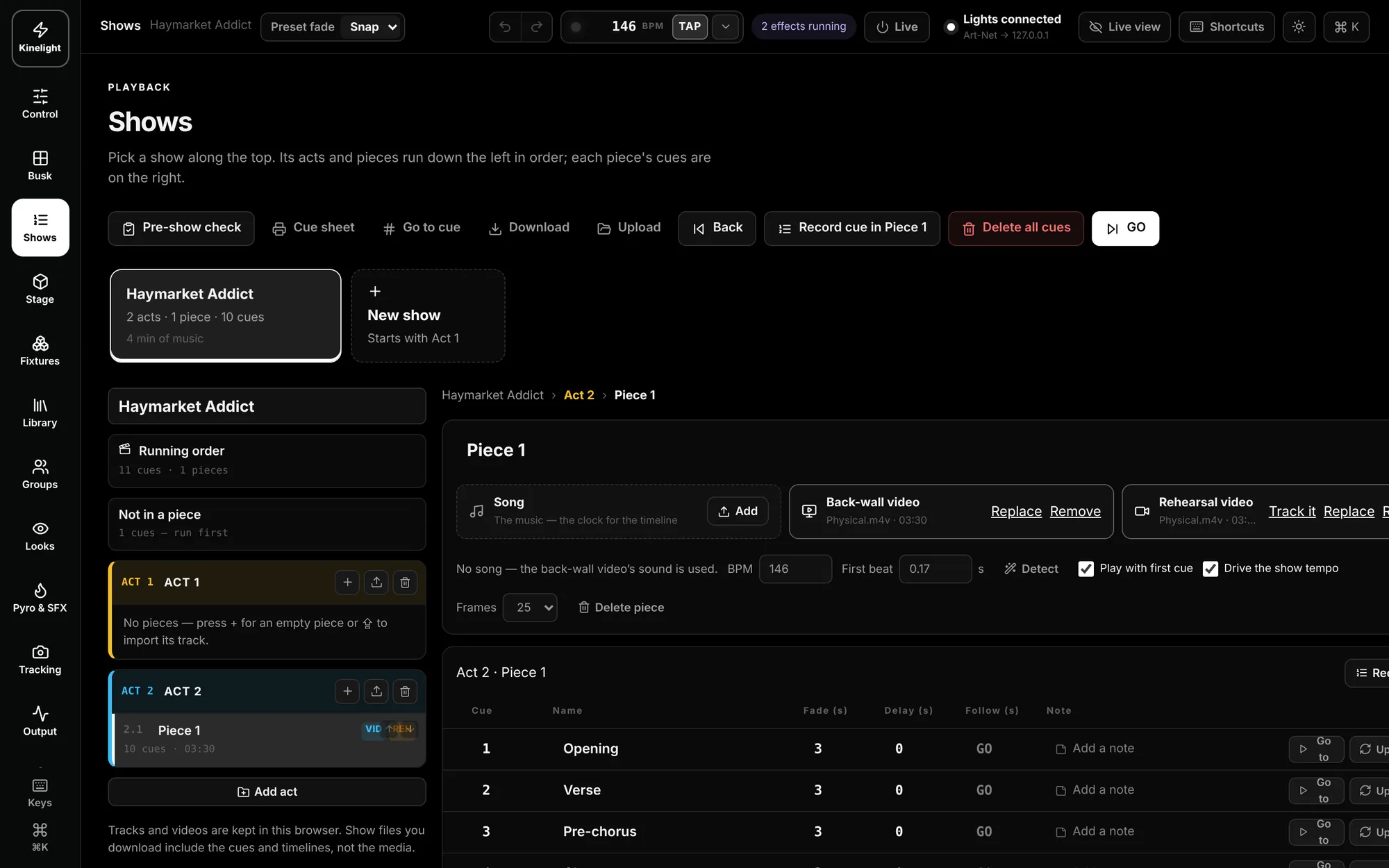
Acts, pieces and cues on the music
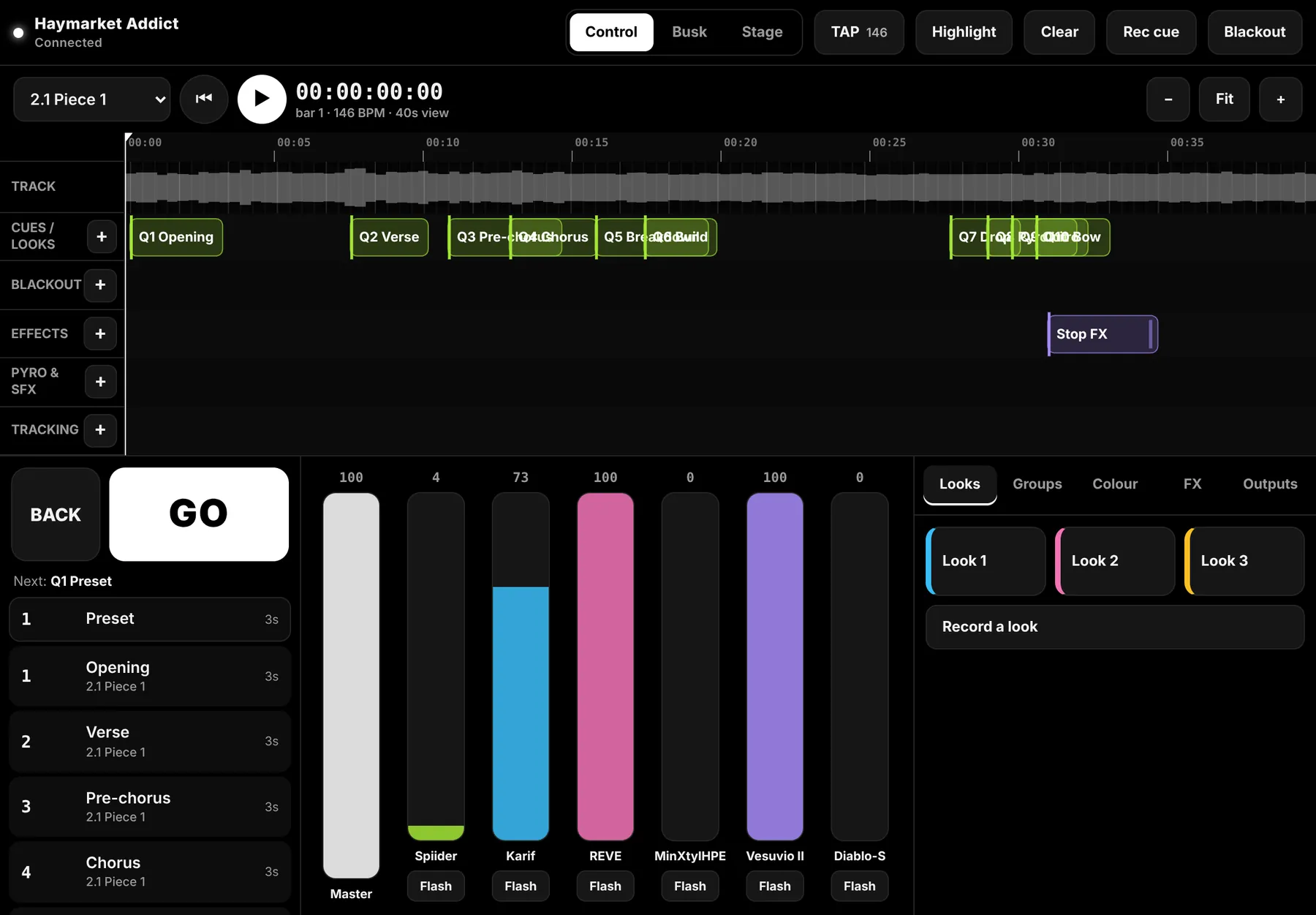
Build the night as acts and pieces. Each piece carries its song, its back-wall video and its rehearsal video, and its cues sit on the music at the piece’s tempo. GO runs it, the same every time.
- Record cues as the track plays
- Print the cue sheet, go to any cue
- A pre-show check before the doors open
- Clear every cue in one go when you start again
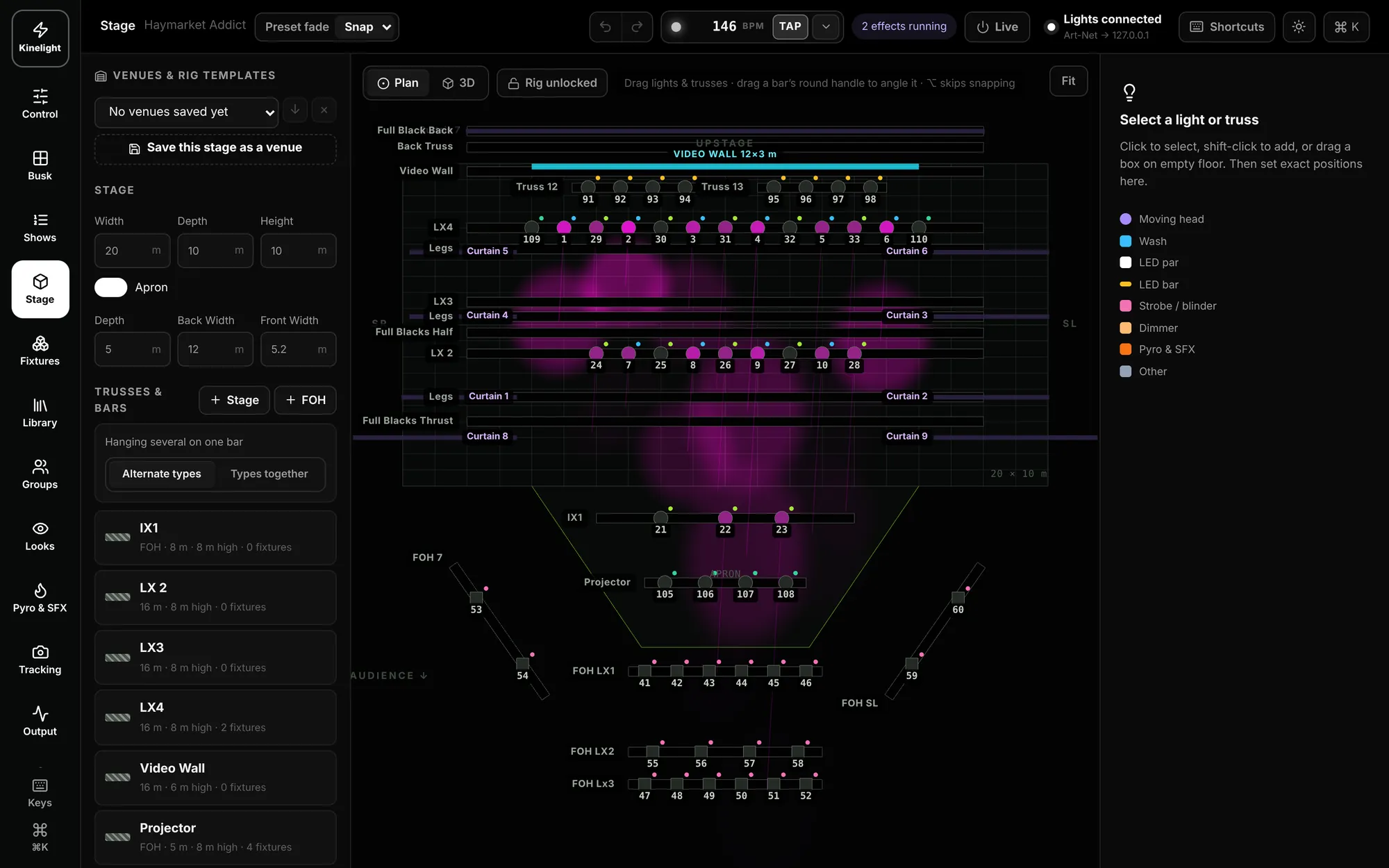
Stage & 3D
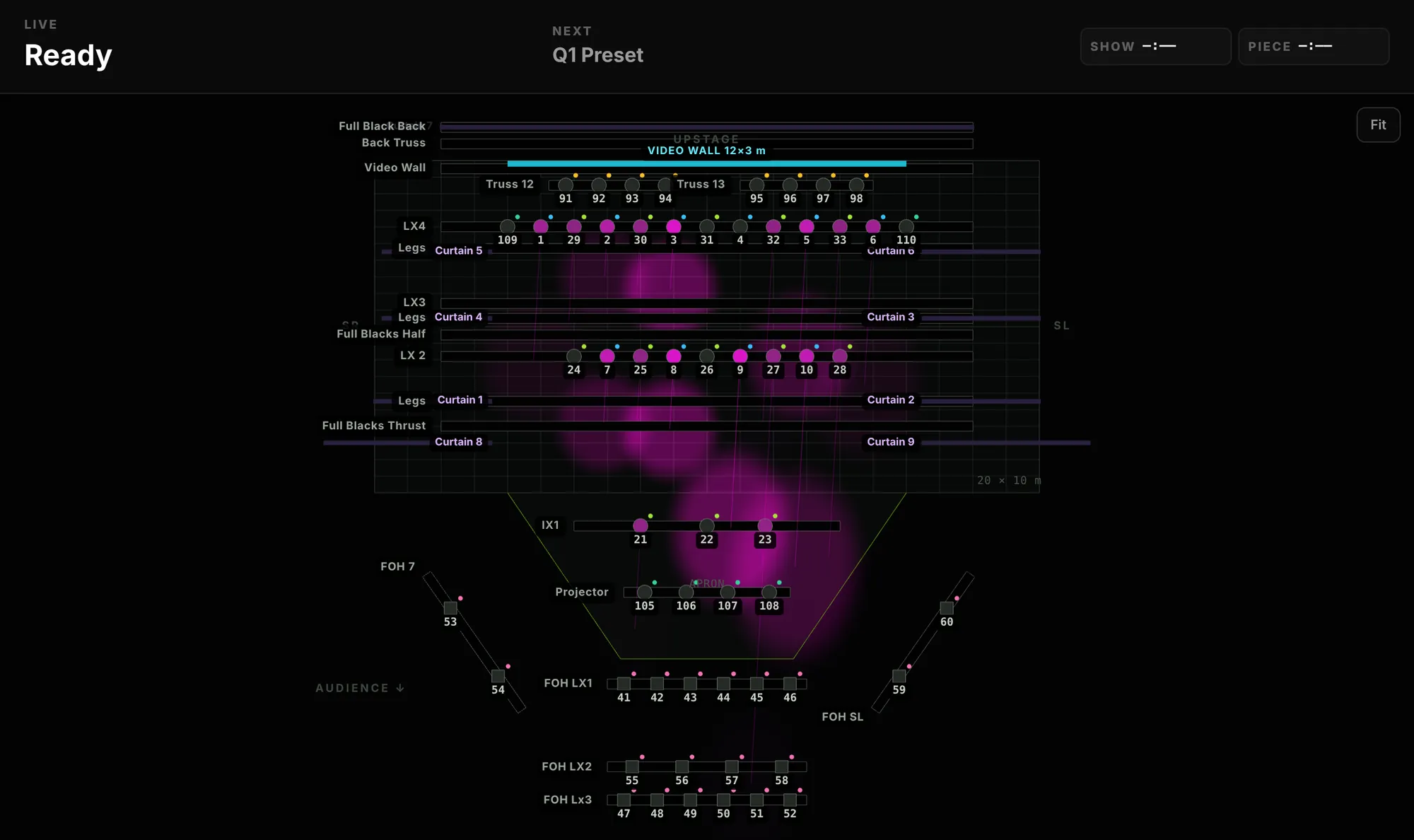
Build the venue, then see it in 3D
Set the stage, hang trusses and bars, place the video wall and drop your fixtures on. Watch the beams in 3D before you’re in the room, and save the stage as a venue for next time.
- Width, depth, apron and wings in metres
- Trusses and bars with their trim heights
- The video wall where it really hangs
- Positions like upstage left and centre, split across the rig
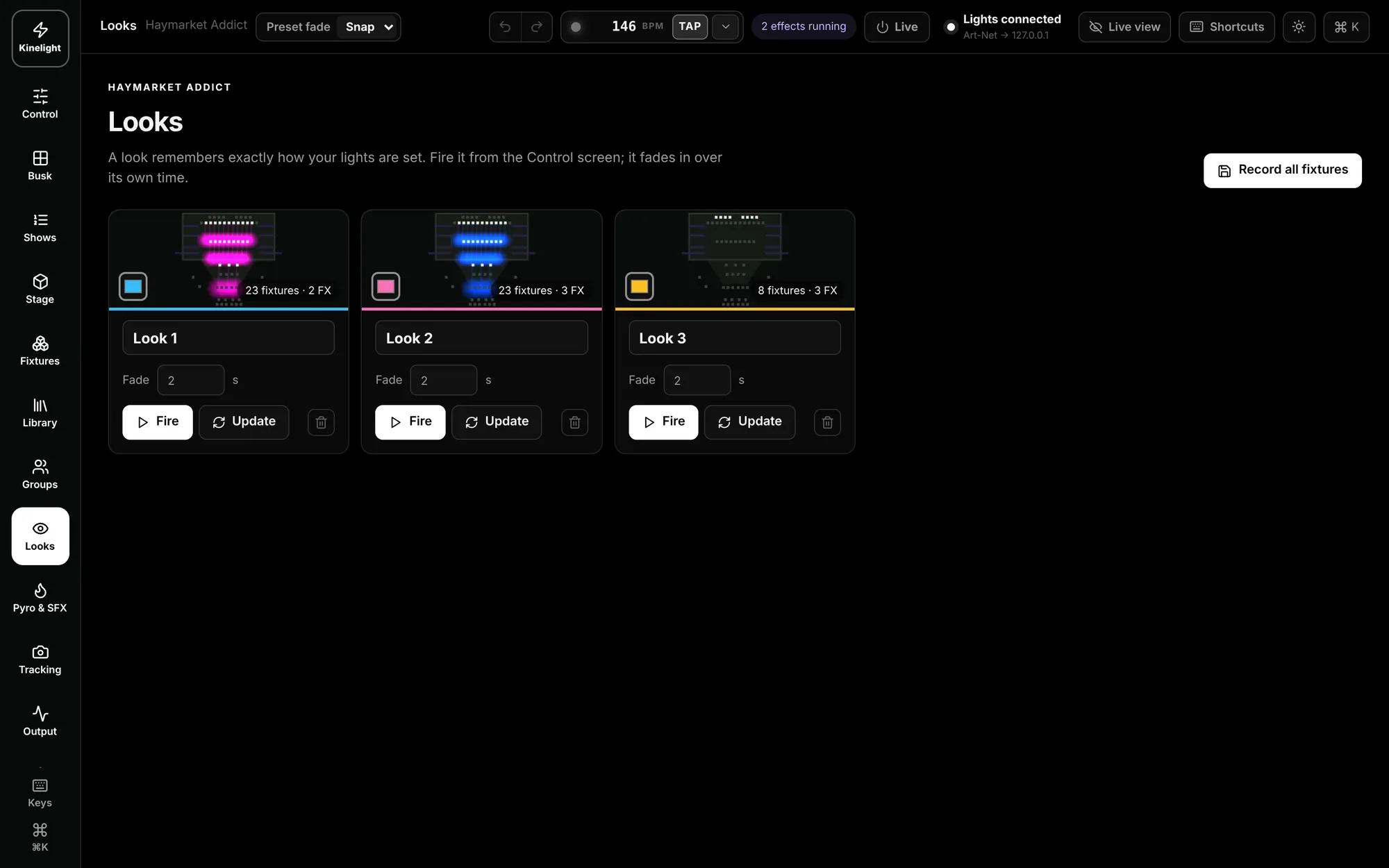
Looks & gobos
Looks in your own words
Describe a look — “moody blue ballad” — and Kinelight builds it. Choose Washes and Gobos and the wash lights take the colour while the spots take gobos, movement and effects. Every look keeps a thumbnail and fades in over its own time.
- Generate looks, with or without AI
- Washes and gobos used for what each does best
- Quick looks: breathe, wave, chase, rainbow roll, fire, ocean
- Fire from Control, update in a tap


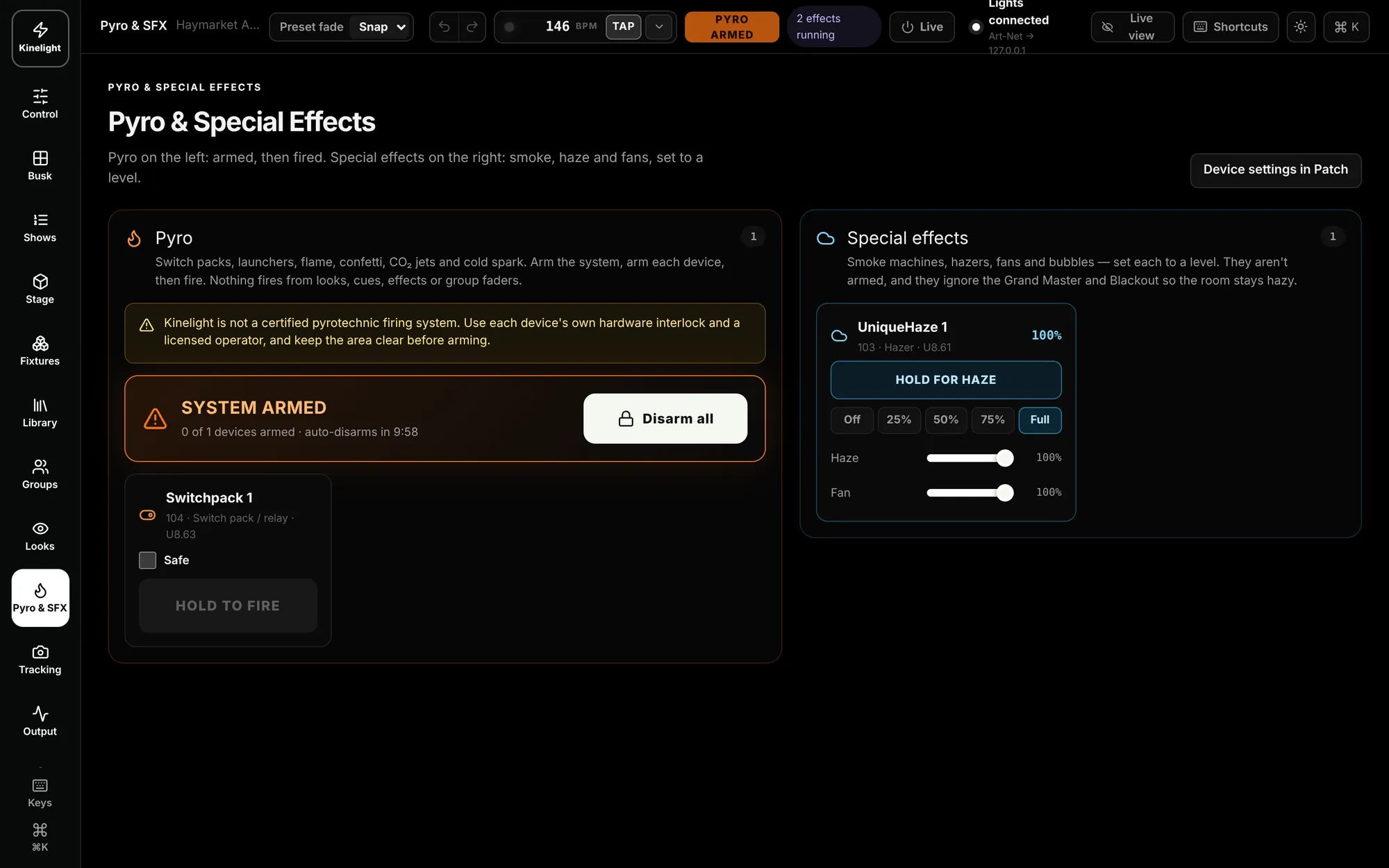
Pyro & SFXKinelight Pro
Armed, then fired
Switch packs, launchers, flame, CO2 jets and cold spark: arm the system, then fire. Smoke machines, hazers, fans and bubbles run on a level, and stay on through Blackout so the room stays hazy.
- Hold to arm, hold to fire
- Pyro and effects cued on the music
- Haze and fans ignore the Grand Master and Blackout
- Use each device’s own interlock and a licensed operator
iPad & phoneKinelight Pro
Your show in your hand
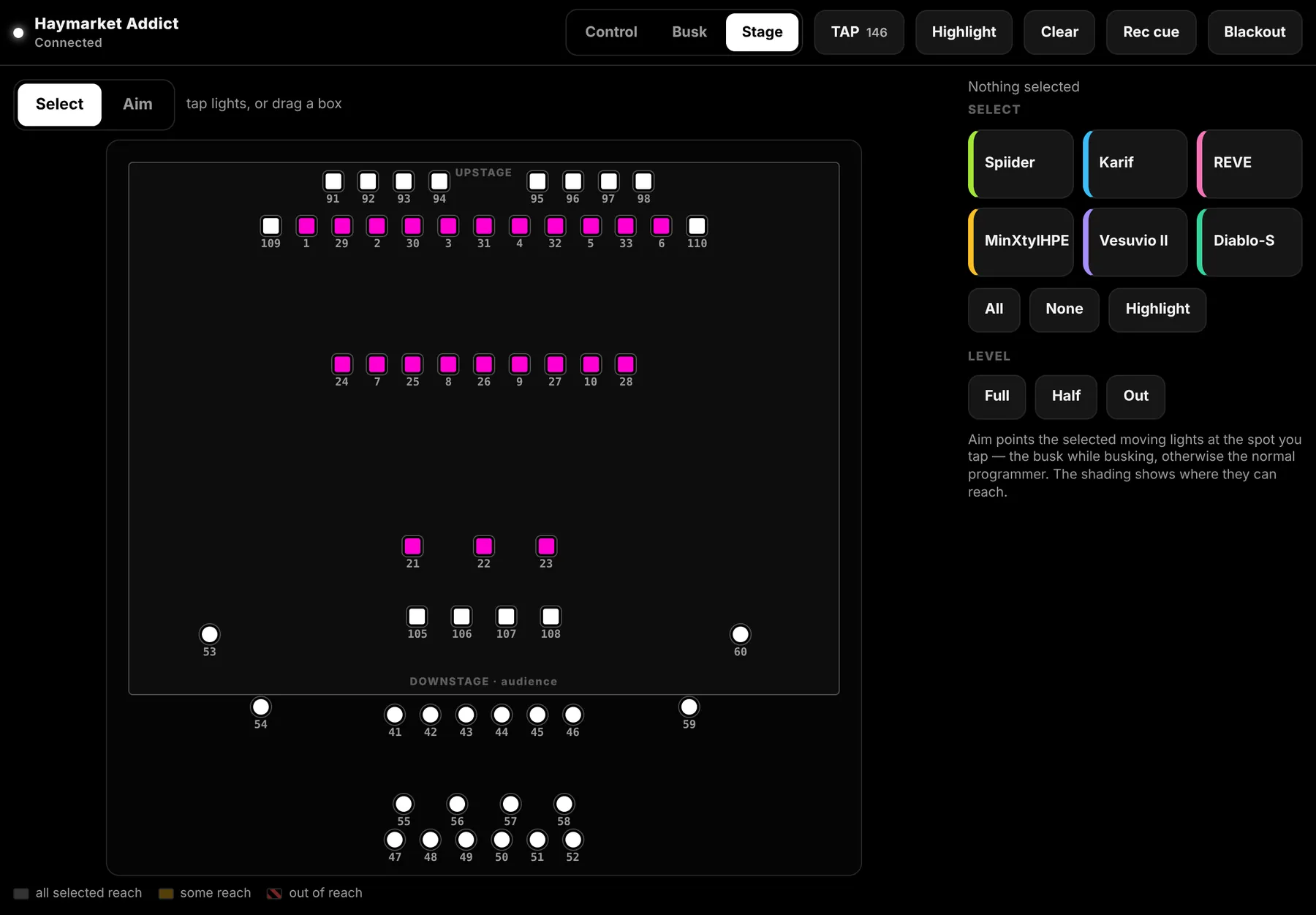
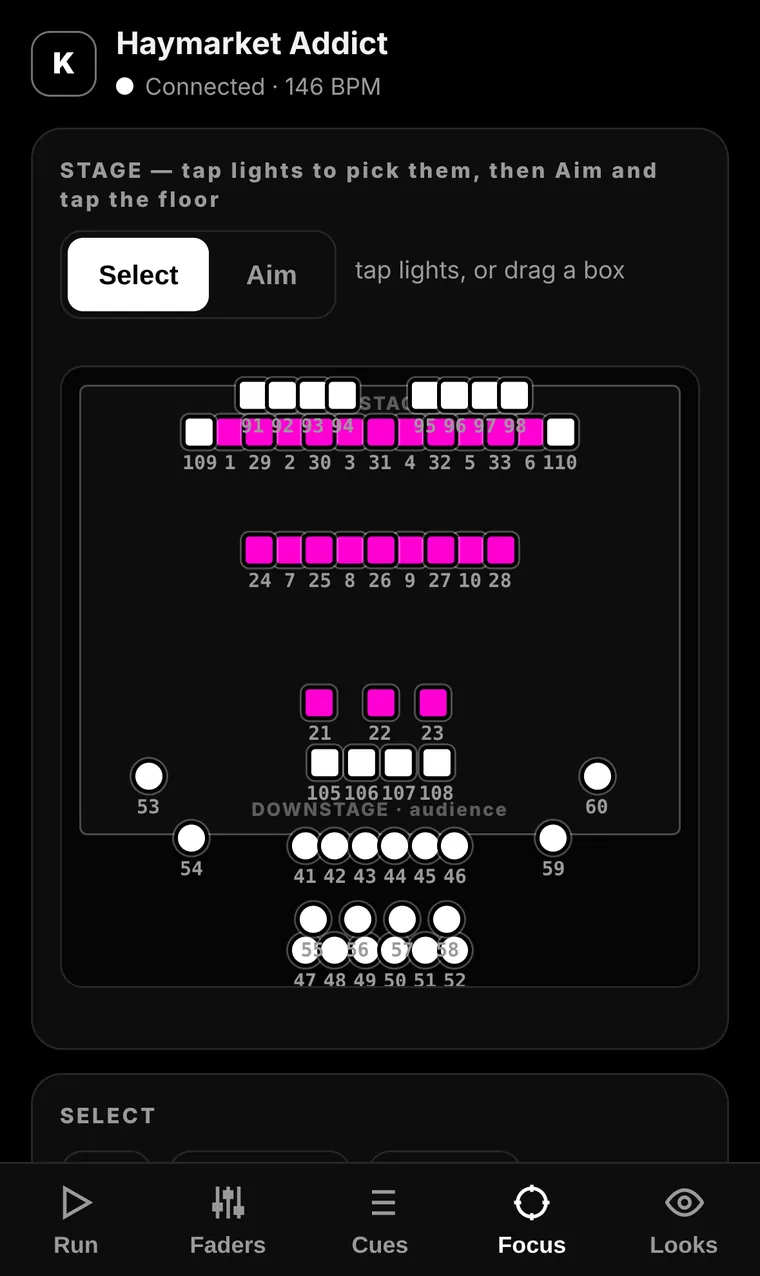
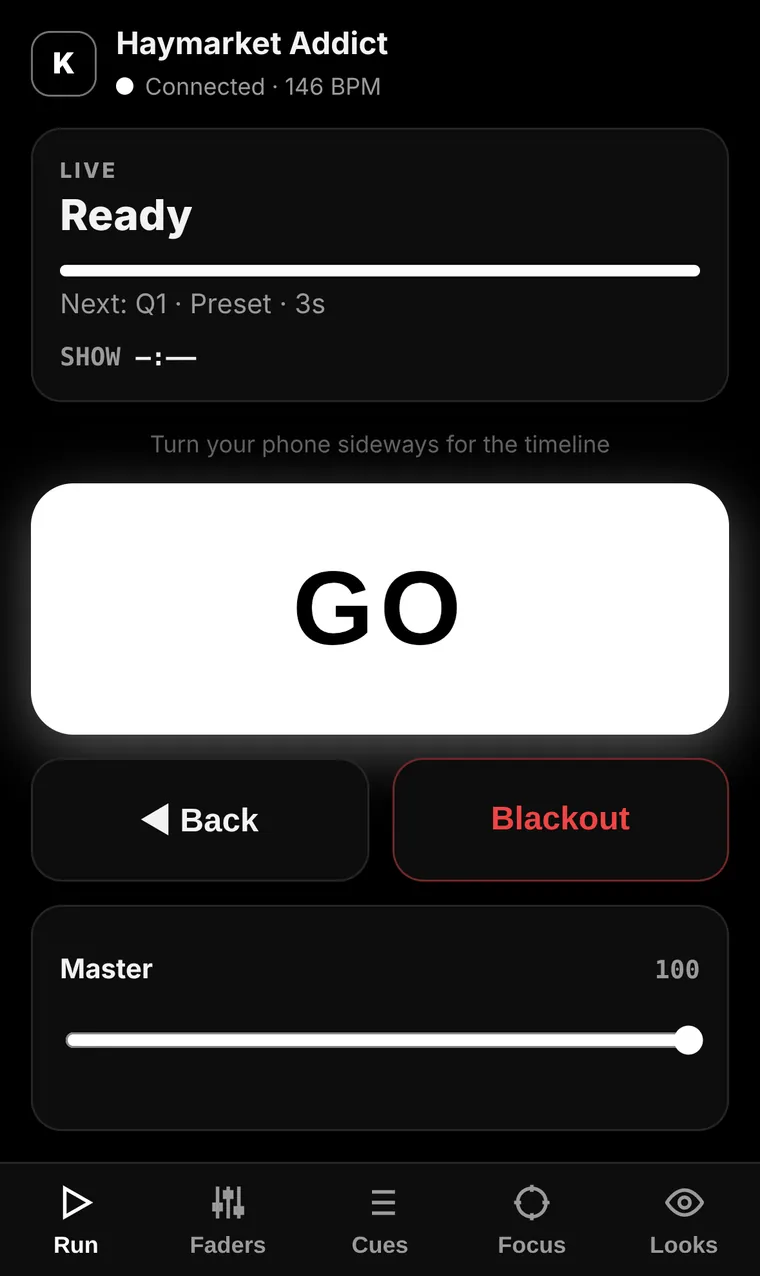
Open the remote on any iPad or phone on the same network. The iPad gets Control, Busk and Stage; the phone gets Run, Faders, Cues, Focus and Looks. See the grid, pick one light or drag a box round ten, then Aim and tap where they should land.
- Select single or multiple fixtures on the stage grid
- Aim, then tap the floor to point them
- GO, Back, Blackout, faders and looks
- PIN protected, black for dark rooms
Art-Net & sACNKinelight Pro
Networking, built in
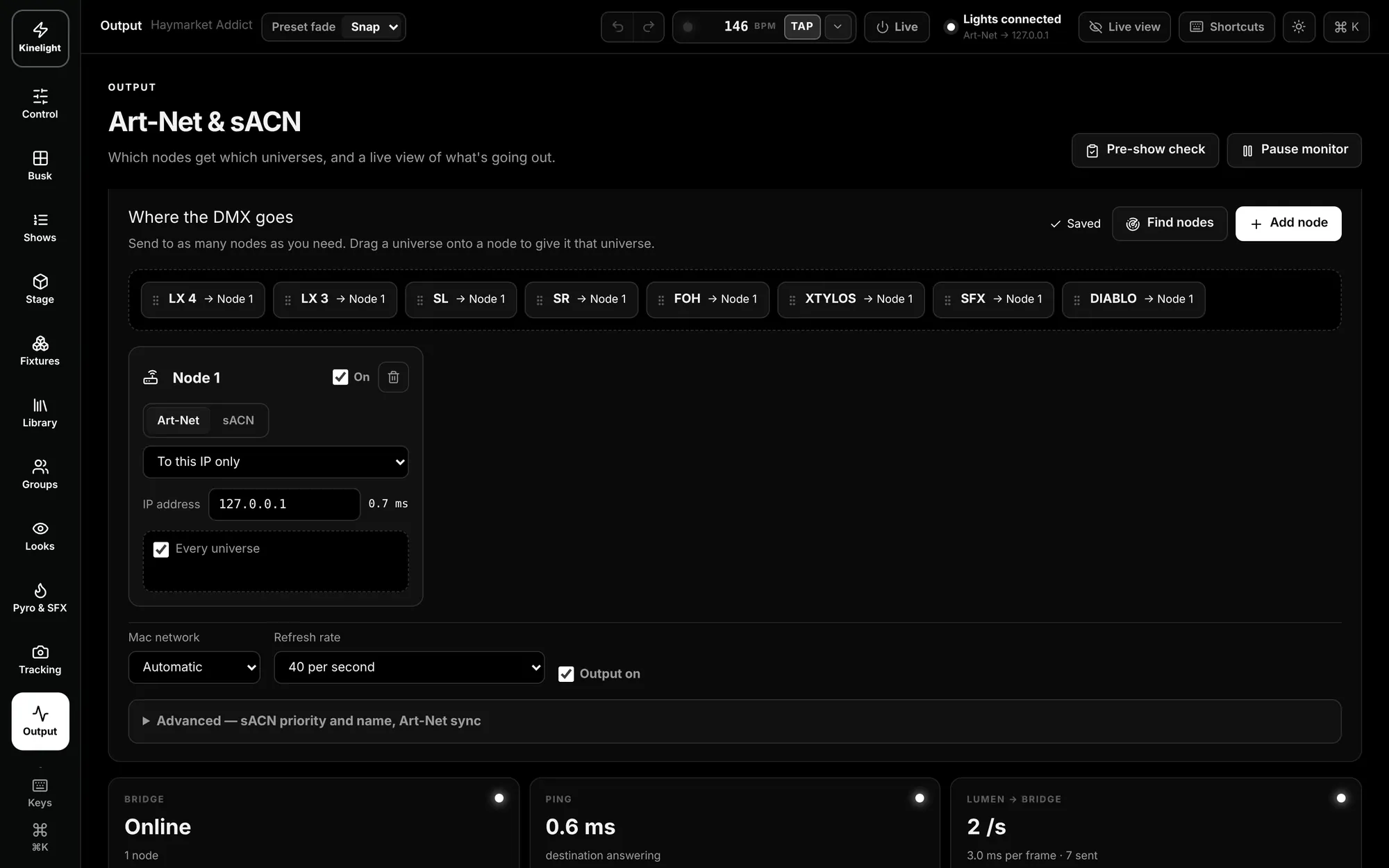
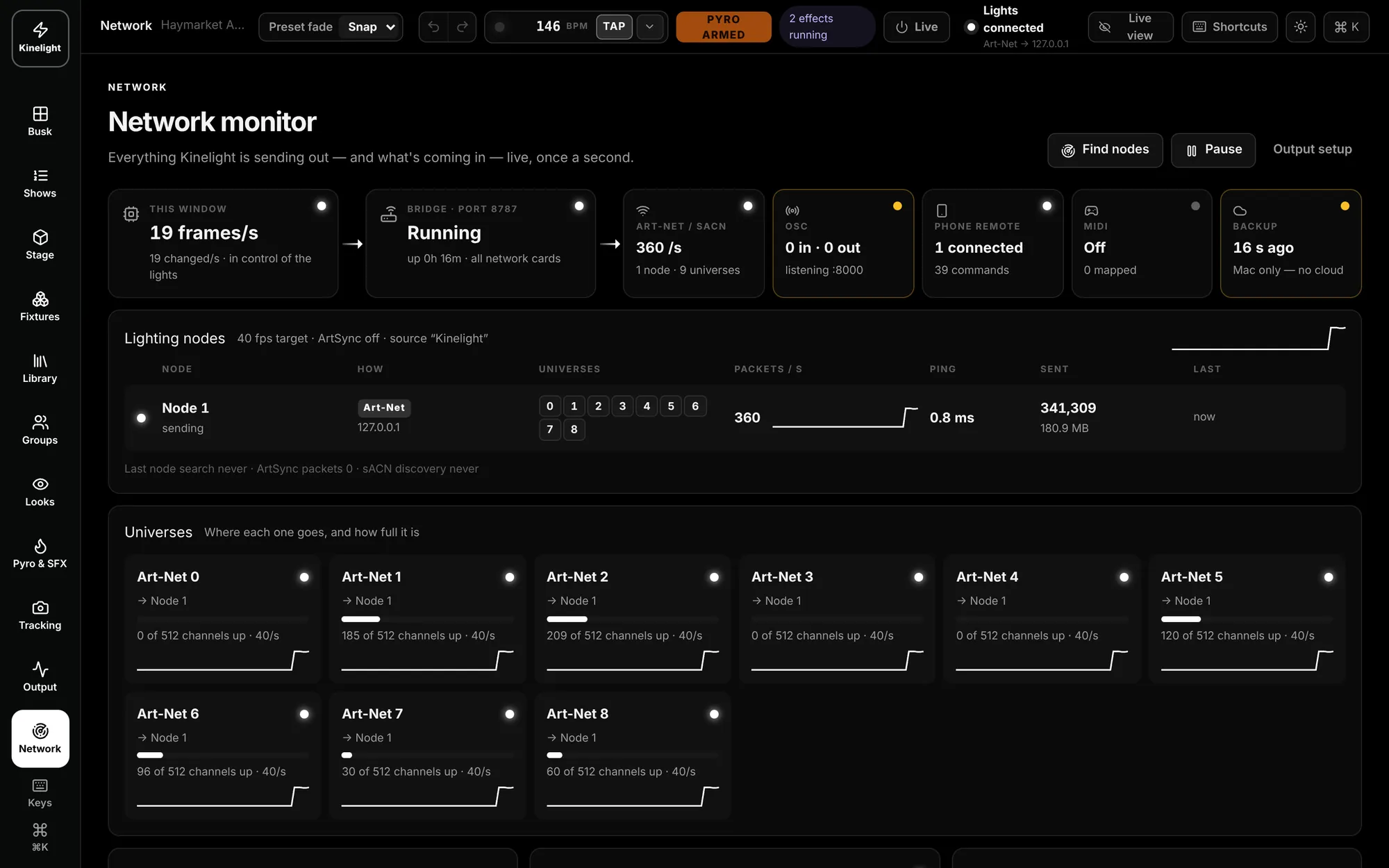
Send to as many nodes as you need, each Art-Net or sACN, to one address or broadcast. Drag a universe onto a node, let Find nodes ask the network, and watch every packet, universe and ping live in the monitor.
- Art-Net and sACN: unicast, broadcast or multicast
- Find nodes on the network
- Flags another console sending the same universe
- Live monitor: frames, packets, ping, OSC, MIDI, the remote and backups
Screens & videoKinelight Pro
Second screens and the video wall
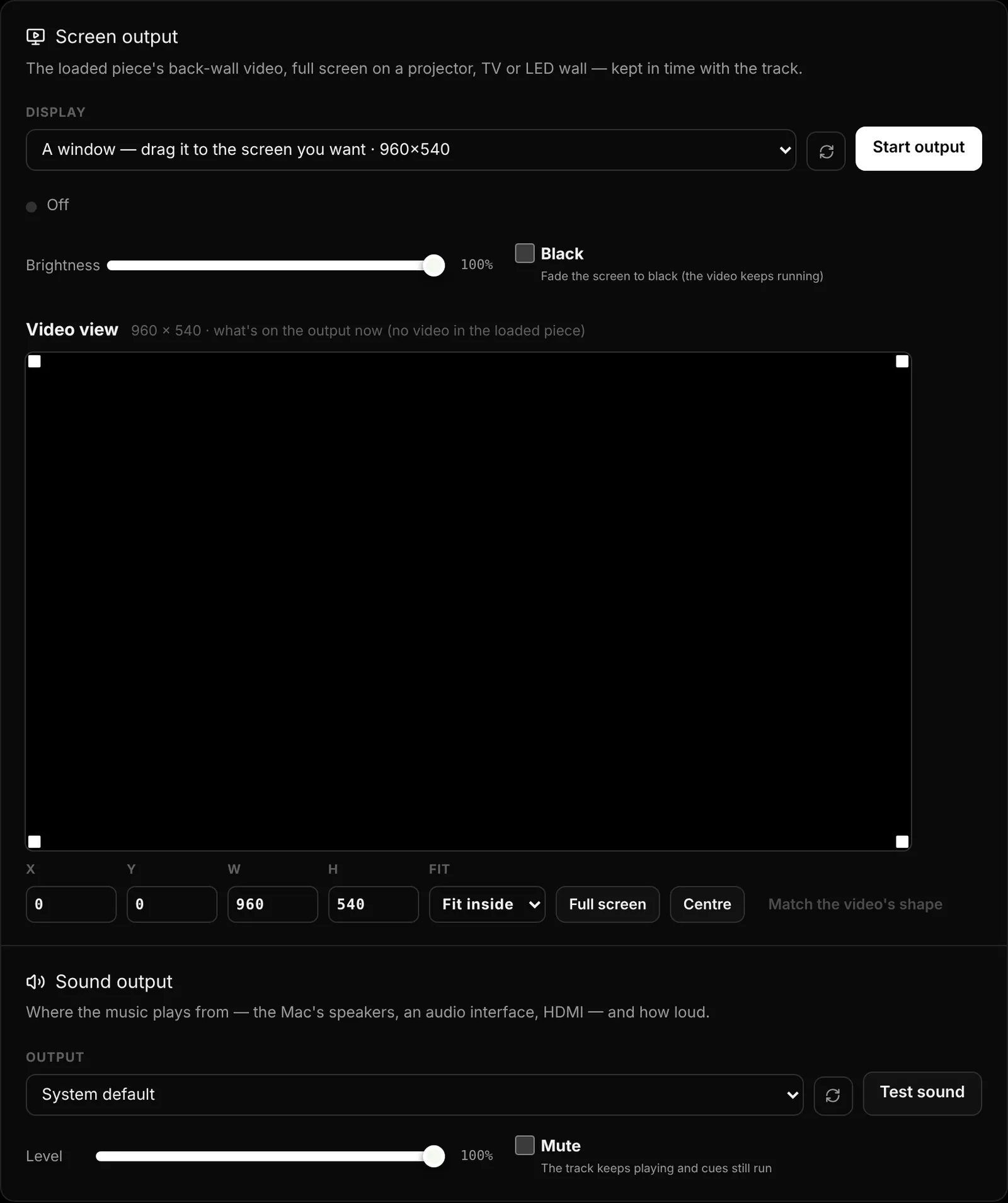
Put the stage or the cue list on another monitor or a TV in the wings — it follows the main window live. Send the back-wall video to an extra display, fit or fill it, fade it to black, and choose where the sound goes.
- Stage view or cue list on any extra screen
- Move the video to a display, start and stop it
- Fit, fill, full screen or match the video’s shape
- Fade to black while the video keeps running
Devices
Made for the kit around a show
Kinelight is tuned for the hardware you already reach for: an APC mini mk2, any MIDI controller, a Stream Deck, an iPad or an iPhone, and every extra screen you plug in.
- APC mini mk2: works the moment it’s plugged in — groups, cues, looks and colours on lit pads, GO and Blackout down the side, faders for groups and the grand master
- Any MIDI controller: press Learn and move a fader or button — groups, the master, any part of a light, effects, pyro or GO
- Stream Deck: give a key one of Kinelight’s shortcuts (Space for GO, B for Blackout), or send OSC like /kinelight/go, /kinelight/look/3 and /kinelight/cue/12
- OSC in and out, for QLab, TouchOSC and the rest of your show control
- iPad and iPhone as remotes, and second screens for the stage and the cue list (Kinelight Pro and Venue)
Fixtures & library
670 profiles, exact channel orders
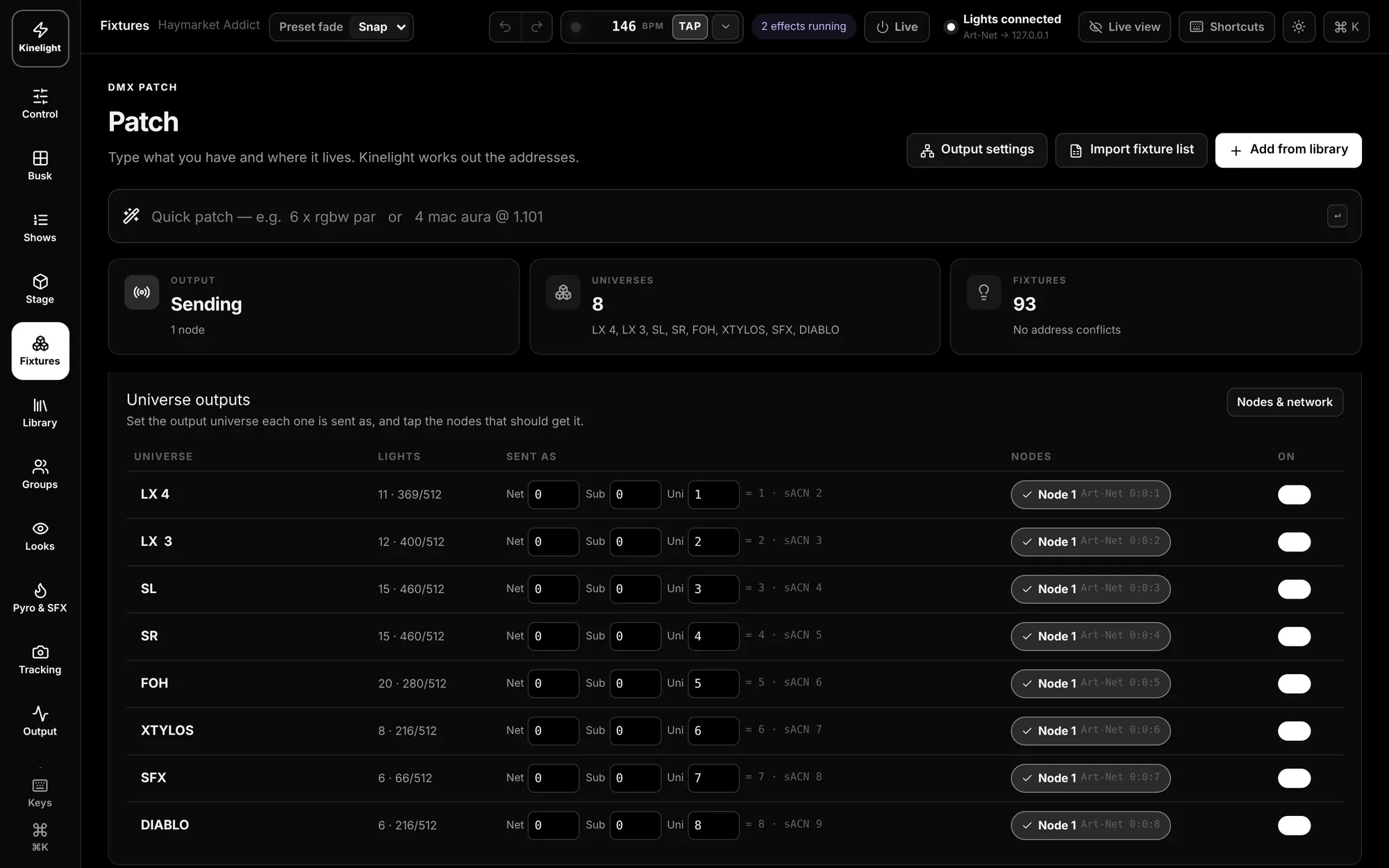
Type what you have and where it lives — “6 x rgbw par” — and Kinelight works out the addresses. Pick from the library, refresh it from the Open Fixture Library, import Avolites or JSON, or build your own.
- Quick patch by typing
- Import a fixture list from the venue
- Universes and nodes laid out for you
- No address conflicts, or you’ll know
Every feature, in detail.
What Kinelight does today, area by area, and which plan has it.
Fixtures & patch
Every plan
- 670 fixture profiles
- Each mode with its exact channel order, pan and tilt range and beam angle.
- Patch by typing
- “8 x RGBW Par @ 2.1” patches eight pars on universe 2 from address 1.
- Profile builder
- Type a channel list or start from a template, then set each channel’s job and home value. Several modes per profile.
- Bring your own
- Refresh from the Open Fixture Library, import Avolites or JSON profiles, or a venue’s fixture list from a PDF.
- Edit in bulk
- Re-address a selection one after another, move it to another universe, or add it to a group. Clashing addresses show in red.
- Fine control
- 16-bit pan and tilt, and console-style fixture numbers on the plan and in the command line.
Stage & 3D
Every plan
- Plan view
- A top-down magic sheet: every fixture shows its live colour and level, labelled with its number.
- 3D view
- Trusses, beams through haze and spots on the floor, drawn from the light output itself.
- Build the venue
- Deck size, apron and wings in metres; trusses and bars at their trim heights and any angle; curtains, FOH bars and an outdoor stage.
- Hang the rig
- Drag fixtures onto a bar, snap to the truss, space a selection evenly, then lock the rig for the show.
- Point here
- Click the floor and the selected movers aim at that spot. Focus presets for centre, downstage, left, right, cross and audience.
- Video wall
- Set its size and height, hang it from a bar, and see the piece’s video on it in 3D.
Control
Every plan
- Groups and masters
- Colour-coded group tiles with a fader each, plus the grand master. Blackout fades out and back over 2 s.
- Programmer
- Intensity always on top, then Colour, Gobo, Position, Beam, Effects and every raw channel.
- Colour
- A colour wheel, whites and CTO, and LEE and Rosco gels. Colour-wheel fixtures go to their nearest slot.
- Gobos, prism and frost
- Each wheel shown as its real gobo pictures, read from the fixture’s profile, with rotation and shake.
- Fan and position
- Spread intensity or pan across a selection in one drag; aim movers on a map of the stage.
- Looks and palettes
- Record a look with its fade time and a picture. Update a palette and every look that uses it follows.
- Keyboard
- ⌘K to jump anywhere, B for Blackout, Space for GO, and every fader, pad and button reachable from the keys.
Busk & effects
Kinelight Pro and Venue
- Your own busk page
- Windows for groups, colour, tempo, effects, looks, positions, beam and masters, placed, pinned and locked where you want them.
- Three layers at once
- Dimmer (pulse, chase, strobe, ramp, flicker), colour (rainbow, two colour, colour chase) and pan and tilt (circle, figure 8, sweep, nod, ballyhoo).
- Shape the spread
- Spread, blocks, wings and direction, and lock any effect to ¼ to 16 beats.
- Tempo
- Tap it, type it, or follow the music from a microphone or the piece’s track.
- Busk fader
- Fade what you busk in and out over 2 s or 5 s. Touching a light takes it, even mid-cue.
Shows & timeline
Kinelight Pro and Venue
- Acts, pieces and cues
- Each piece carries its song, its back-wall video and its rehearsal video.
- GO and Back
- Fade, delay and follow times per cue; the GO button shows the fade, delay and follow countdown. Space is GO.
- Timeline
- Lanes for cues, looks, effects, blackout, pyro and tracking on the music’s waveform, snapping to the beat, bar or frame.
- Record live
- With REC on and the track playing, a cue lands on the timeline where you press it.
- Before the doors
- Print the cue sheet and run the pre-show check.
Pyro & SFX
Kinelight Pro and Venue
- Armed, then fired
- Hold to arm the system, arm each device, then hold or pulse to fire, or fire all.
- Every kind of device
- Switch packs, launchers, flame, CO₂, cold spark, confetti, wind machines and MagicFX.
- Atmosphere on a level
- Haze, smoke, fans and bubbles run on a fader and ignore the grand master and Blackout.
- Safe by default
- Looks, cues and effects never fire pyro; the pyro lane on the timeline does, once armed.
Camera tracking
Kinelight Venue
- Every dancer numbered
- Body tracking finds each person on a front-of-house camera or a rehearsal video, with head, hands and feet.
- Calibrated floor
- Mark 4 to 9 points on the stage and positions are measured in metres.
- Follow spots
- Lights follow one dancer, everyone, or a group’s centre, aimed at the body part you pick, easing ahead to cover motor lag.
- Rehearsal as the guide
- Analyse the rehearsal video once and the show follows who stood where, even when someone is hidden.
Remote & screens
Kinelight Pro and Venue
- iPad
- Control, Busk and Stage, with the busk page mirrored from the Mac.
- Phone
- Run, Faders, Cues, Focus and Looks. Pick lights on the stage grid, then Aim and tap the floor.
- Locked down
- PIN protected, black for dark rooms, on the same network as the Mac.
- Second screens
- The stage or the cue list on any extra display, following the main window live.
- Back-wall video
- To a projector, TV or LED wall in time with the track: fit, fill or fade to black, and choose where the sound goes.
Network & hardware
Every plan, Pro where marked
- Art-Net and sACN
- Unicast, broadcast or multicast. Kinelight sends one universe, Kinelight Pro four and Kinelight Venue as many as you need.
- Find nodes (Pro)
- Ask the network what’s there, drag a universe onto a node, and get a warning when another console sends the same universe.
- Network monitor (Pro)
- Frames, packets, ping, OSC, MIDI, the remote and backups, live every second.
- APC mini mk2
- Works the moment it’s plugged in: groups, cues, looks and colours on lit pads, GO and Blackout down the side.
- MIDI and Stream Deck
- Press Learn and move any fader or button. Give a Stream Deck key a Kinelight shortcut.
- OSC (Pro)
- In and out, for QLab, TouchOSC and the rest of your show control: /kinelight/go, /kinelight/look/3.
Running the show
Every plan
- Main and backup Mac
- Every plan includes both. Choose which is which when you sign in, and swap them live.
- Works offline
- The licence lives on your Mac and checks in at least every 15 days. Light output is never cut mid-show.
- Backups
- Every change saved as you go, with a copy in Google Drive, Dropbox or iCloud if you like.
- Show files
- Export the whole show as one file and open it on another Mac.
The things you only notice when they’re missing.
Camera tracking
A camera at front of house — or a piece’s rehearsal video — and Kinelight numbers each dancer so lights can follow a person or a group. Part of Kinelight Venue.
Works offline
Your licence lives on your Mac. It checks in at least every 15 days; in between, no internet needed.
Backups, always
Every change is saved as you go, with a copy in your Google Drive, Dropbox or iCloud folder if you like.
Mac only, for now
Kinelight runs on a Mac with Apple silicon and macOS 12 or later. Download it from your account once you’ve subscribed.
From £199 a month.
Kinelight for control and patching, the whole show with Kinelight Pro for £399, or every room with Kinelight Venue, priced for your building. A main Mac and a backup Mac included with every plan.